How to Import CSV Into PostgreSQL: A Practical Guide
Learn how to import CSV into PostgreSQL using the COPY command, pgAdmin, and Python. This guide offers actionable steps and real-world examples for developers.

Getting data into your database is one of those fundamental tasks you'll do again and again. When that data is in a CSV file, you need a solid, efficient way to import it into PostgreSQL. You've got a few great options here, and they generally fall into three camps: the super-fast COPY command in your terminal, a user-friendly GUI tool like pgAdmin, or a slick, automated Python script.
Each method has its place, and the best one really depends on what you're trying to do—from a quick one-off data load to a full-blown automated pipeline.
Why Mastering CSV Imports To PostgreSQL Is Essential
If you've ever worked as a developer or data analyst, you know the drill. Someone hands you a spreadsheet and says, "We need this in the database." It could be anything—customer lists, product inventories, event logs. The CSV (Comma-Separated Values) format is the lingua franca for this kind of data exchange.
Knowing how to import these files efficiently isn't just a nice-to-have skill; it’s a critical part of the job. It saves a ton of time and helps you sidestep frustrating errors. The right approach for a quick, one-off import of a tiny lookup table is completely different from what you'd need for an ETL pipeline that pulls in thousands of records every hour.
Choosing The Right Import Method
The three main ways to get your CSV data into Postgres cater to different priorities: raw performance, visual simplicity, and hands-off automation. The command line gives you incredible speed for massive datasets. A good GUI provides a visual safety net for manual tasks. And scripting is the gold standard for building repeatable data workflows.
Figuring out the trade-offs is everything. This little decision tree can help you pick the right path based on what matters most to you right now: speed, a visual interface, or automation.
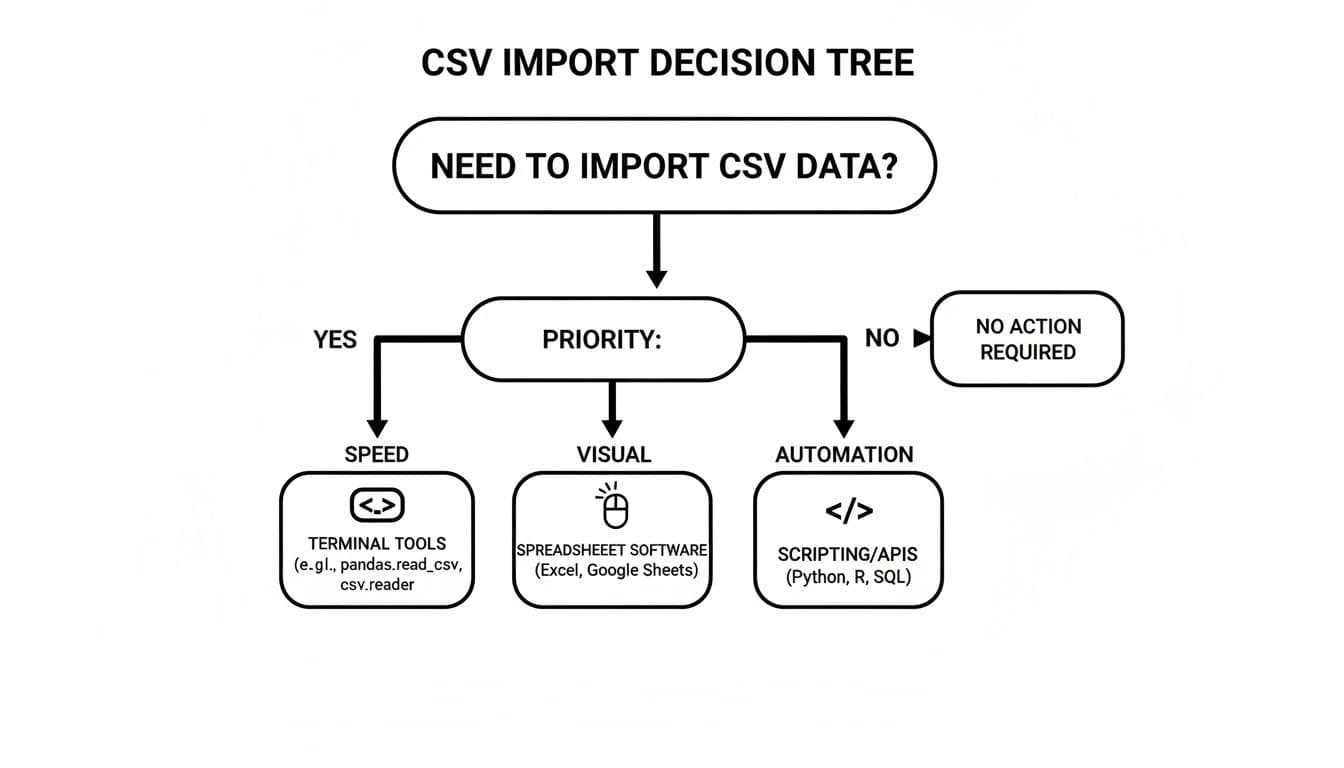
Think of it as a quick cheat sheet. It points you toward the best tool for the job by focusing on your main goal.
Choosing Your CSV Import Method
To make it even clearer, here’s a quick breakdown of the three primary methods. This table lays out their best use cases and what makes them tick.
| Method | Best For | Key Advantage | Common Scenario |
|---|---|---|---|
psql Command (COPY / \copy) | Large datasets and performance | Blazing-fast native bulk loading | Migrating millions of records from a legacy system. |
| GUI Tools (pgAdmin, TableOne) | One-off imports and visual users | Error visibility and intuitive workflow | Uploading a new product catalog sent via spreadsheet. |
| Programmatic (Python) | Automation and recurring tasks | Repeatable, customizable, and testable | Building a daily pipeline to ingest user activity logs. |
Each of these tools shines in its own context. You wouldn't use a screwdriver to hammer a nail, and the same principle applies here.
A Roadmap For Your Data Needs
Consider this guide your map for navigating the different import techniques. We're about to dive deep into each of these paths, complete with practical, real-world examples you can use right away.
We’ll cover:
- Maximum Performance: How to use the native
COPYcommand to bulk-load millions of rows in seconds. - Visual Control: Using GUI tools like pgAdmin or TableOne for clean, error-free, one-time imports.
- Repeatable Automation: Writing Python scripts with libraries like
psycopg2orpandasfor tasks that run on a schedule.
PostgreSQL continues to be a favorite among developers for good reason. It’s robust, incredibly extensible, and it strictly adheres to SQL standards. For applications that demand data integrity and solid performance, it’s a fantastic foundation.
By getting a feel for the strengths of each method, you'll be ready to tackle any data import challenge that comes your way. While the database world is full of great options, many developers lean on PostgreSQL for its reliability. If you’re curious how it stacks up against other giants, our comparison of MySQL vs PostgreSQL is a good read.
The Command Line Powerhouse: The COPY Command
When you need to get a CSV into PostgreSQL, and you need it done fast, the native COPY command is your best friend. It’s the undisputed king of bulk data loading for a reason. It's built to move massive amounts of data directly from a file into a table with almost no overhead. Forget plodding, row-by-row INSERT statements; COPY is pure, unadulterated speed.
The magic behind it is that the command reads the file and streams the data directly into your table in a single, efficient transaction. This makes it the go-to method for everything from database migrations and initial data seeding to loading huge datasets from external sources.
The Basic COPY Syntax
At its heart, the COPY command is refreshingly simple. You just need to tell it the target table, the source file, and the format. Let’s walk through a quick example. Say you have a customers.csv file and a matching customers table waiting in your database.
Here’s a peek at the CSV file:
id,first_name,last_name,email
1,Alice,Smith,alice.smith@example.com
2,Bob,Johnson,bob.johnson@example.com
3,Charlie,Brown,charlie.brown@example.com
And here’s the SQL to get the table ready:
CREATE TABLE customers (
    id INT PRIMARY KEY,
    first_name VARCHAR(50),
    last_name VARCHAR(50),
    email VARCHAR(100)
);
Once the table exists, this single command does all the heavy lifting:
COPY customers FROM '/path/to/your/customers.csv' WITH (FORMAT CSV, HEADER);
This line tells PostgreSQL to copy data into the customers table from that specific file path. The WITH (FORMAT CSV, HEADER) part is critical. FORMAT CSV specifies the file type, and HEADER lets PostgreSQL know it should skip the first row because it just contains the column names.
Understanding COPY vs. \copy
One of the first things that trips people up is the difference between COPY and \copy. They look almost identical and do the same job, but where they run from is fundamentally different, which has big implications for permissions and file access.
-
COPY: This is a server-side command. It tells the PostgreSQL server itself to read a file from its own local filesystem. Because the server process is the one doing the reading, you generally need to be a database superuser to run it. The file also has to be on the server machine, or at least accessible from it. -
\copy: This is a client-side meta-command built intopsql, the interactive terminal. It reads a file from the filesystem of your local machine—the one you're runningpsqlon—and then streams that data over the network to the server. The best part? It doesn’t require superuser privileges.
My Rule of Thumb: If I'm working on my local laptop and connecting to a remote database (like one on AWS RDS or Heroku), I'm using
\copy99% of the time. The server can't see my desktop! I only useCOPYwhen I'm actually SSH'd into the database server and have direct filesystem access.
The syntax for \copy is nearly identical. If you were logged into your database through psql, you'd run this:
\copy customers FROM '/path/on/your/local/machine/customers.csv' WITH (FORMAT CSV, HEADER);
Just note the lack of a semicolon at the end—that's a quirk of psql meta-commands.
Dealing with Real-World CSV Messiness
Let's be honest, real-world CSVs are rarely perfect. They come with different delimiters, funky character encodings, or weird ways of representing null values. Thankfully, COPY is flexible enough to handle these quirks with a few extra options.
Imagine you’re a developer at a startup, and the sales team just handed you a spreadsheet with 50,000 customer interactions. Using COPY here is a game-changer. It can be up to 100x faster than scripting INSERT statements. You can find more on these performance metrics at Coefficient.io, but think about loading 1 million rows in under a minute versus hours of looping.
Let's look at a more complex file, products.csv, that uses a pipe (|) delimiter and has empty strings where a price is missing:
product_id|product_name|price
101|Widget A|19.99
102|Gadget B|
103|Gizmo C|49.50
To import this correctly, you can specify the delimiter and how you want to handle those empty values:
\copy products FROM 'products.csv' WITH (FORMAT CSV, HEADER, DELIMITER '|', NULL '');
Here, DELIMITER '|' tells PostgreSQL to split columns on the pipe character, and NULL '' is our instruction to treat any empty strings as proper NULL values in the database. This kind of control is exactly what you need to import messy data without having to clean it all up by hand first.
Visual and User-Friendly Imports With GUI Tools
The command line is powerful, no doubt. But for quick, one-off data loads or for those who just prefer seeing what they’re doing, a good Graphical User Interface (GUI) is a lifesaver. It’s the perfect safety net, letting you visually map columns, preview your data, and catch potential errors before you commit.
Think about it: a colleague just dropped a spreadsheet on you, and you need to get it into the database now. Firing up a GUI turns what could be an error-prone scripting task into a simple, point-and-click process.
Streamlining Imports With pgAdmin
As the go-to management tool for PostgreSQL, pgAdmin naturally comes with a solid import wizard. It’s surprisingly powerful and walks you through the whole process, making it the perfect starting point if you want to import a CSV into PostgreSQL visually.
Let's run through a typical scenario. You've got a product_updates.csv file that needs to be loaded into your existing products table.
- Find Your Table: In the pgAdmin object browser, navigate down through your database and schemas to find the target table (like
public.products). Right-click on it. - Open the Import Tool: In the menu that pops up, hit "Import/Export...". This opens the dialog box where all the magic happens.
- Set Up the Import: Switch the toggle from "Export" to "Import," then point it to your
product_updates.csvfile. The most important part is the "Options" tab—this is where you dial in the settings.
Here’s what you'll configure under "Options":
- Format: Make sure this is set to
csv. - Header: Flip this switch on if your CSV has a header row. This tells pgAdmin to skip that first line and not treat it as data.
- Delimiter: Pick your delimiter. It's usually a comma (
,), but I've seen plenty of files that use semicolons (;) or even pipes (|).
This visual approach is great for avoiding those little command-line mistakes that trip everyone up, like forgetting a flag or mixing up delimiters.
Mapping Columns and Handling Data
Where the pgAdmin wizard really proves its worth is in handling messy, real-world files. In the "Columns" tab, you'll see a list of columns from your database table. You can pick and choose which columns from your CSV to import, easily skipping any that are irrelevant.
This is a game-changer when the columns in your CSV file don't line up perfectly with your table's schema. Instead of manually rearranging the CSV—a tedious and risky job—you just tell pgAdmin how to map everything on the fly. Data analysts all over the world are constantly wrangling CSVs, and for millions of them, the pgAdmin wizard turns these one-off imports into a reliable, repeatable routine.
Key Takeaway: The pgAdmin import wizard is your best friend for visually guided, one-time imports. Its ability to manage headers, delimiters, and column mapping in a simple interface massively cuts down on human error.
A Modern Alternative: TableOne
While pgAdmin is a fantastic all-in-one tool, its sheer number of features can sometimes feel like overkill for a simple import. That’s where sleek, modern database clients like TableOne come in. It’s built from the ground up to simplify the exact workflows that developers and analysts use every day, and CSV imports are front and center.
The interface is clean and uncluttered, designed to keep you focused on getting your data into the database quickly and without fuss.
TableOne is especially handy if you’re working with managed database providers like Neon, Supabase, or PlanetScale, where you might not have the direct server access required for a COPY command. Its import process is incredibly intuitive, often getting the job done in fewer clicks than more traditional tools. If that sounds like it fits your workflow, you can download the TableOne desktop app and give it a spin.
The real advantage of a tool like TableOne is its laser focus. It doesn't try to be a Swiss Army knife; it just excels at the essential, everyday tasks. That makes it a remarkably efficient choice for teams who value speed and simplicity.
When you're dealing with repeatable tasks like refreshing a reporting table or building an ETL pipeline, manual imports just aren't sustainable. This is where automation takes over, and Python is the perfect tool for the job. By scripting your imports, you create a reliable, testable, and hands-off process for getting CSV data into PostgreSQL.
We'll look at two of the most popular and effective Python libraries for this. First is psycopg2, the powerhouse PostgreSQL adapter that gives you raw access to the database's best features. Then, we'll cover pandas, the undisputed king of data manipulation, which makes it a breeze to load data after you’ve cleaned it up.
High-Performance Imports With Psycopg2
If you need the raw speed of the COPY command but want to run it from an automated script, psycopg2 is your go-to. It has a special function, copy_expert(), that lets you execute a COPY command programmatically. This is the professional standard for high-performance applications that need to import a CSV into PostgreSQL without any speed compromises.
This approach gives you the best of both worlds: the blazing efficiency of the command line and the flexibility of a Python script. You simply build a COPY statement as a string and pass it to the function, letting your script handle the file operations.
Here’s a real-world example of how to use copy_expert to load a users.csv file.
import psycopg2

# Database connection details
conn_string = "dbname='yourdb' user='youruser' host='localhost' password='yourpassword'"

try:
    with psycopg2.connect(conn_string) as conn:
        with conn.cursor() as cur:
            # Open the CSV file for reading
            with open('path/to/your/users.csv', 'r') as f:
                # Prepare the COPY statement. Notice FROM STDIN.
                sql_statement = """
                    COPY users(id, username, email)
                    FROM STDIN WITH (FORMAT CSV, HEADER)
                """

                # Execute the COPY command, passing the file object
                cur.copy_expert(sql=sql_statement, file=f)
    print("CSV data imported successfully!")
except Exception as e:
    print(f"An error occurred: {e}")
The magic here is FROM STDIN. It tells psycopg2 to read data directly from the file object (f) that we pass into the function. This is incredibly efficient because it streams the file data straight to the PostgreSQL backend, mimicking the behavior of the \copy command in psql.
Data Manipulation and Loading With Pandas
What if your CSV data needs some work before it hits the database? Maybe you need to clean up messy date formats, drop irrelevant columns, or perform some calculations. For these scenarios, the pandas library is a game-changer.
Pandas excels at reading structured data into a powerful in-memory object called a DataFrame. Once your data is in a DataFrame, you can slice, dice, and transform it with just a few lines of code. When it's ready, you can push the clean data to a PostgreSQL table with a single command. This workflow is a daily reality for data scientists and analysts.
A Quick Word on Performance: While incredibly convenient, the
pandasto_sql()method is generally slower than a directCOPYfor very large files. It often works by generatingINSERTstatements under the hood, which have more overhead than PostgreSQL's native bulk-loading protocol. For pure speed on massive datasets,psycopg2wins.
Let’s walk through how to use pandas with SQLAlchemy (which to_sql uses to connect to the database).
First, make sure you have the necessary libraries installed:
- pandas: For reading the CSV and data wrangling.
- SQLAlchemy: To create the database engine that pandas connects through.
- psycopg2: The underlying driver that SQLAlchemy uses to talk to PostgreSQL.
Here’s the code to read a sales_data.csv file, do some light transformation, and write it to a table named sales_records:
import pandas as pd
from sqlalchemy import create_engine

# A single connection string for SQLAlchemy
db_url = 'postgresql://youruser:yourpassword@localhost:5432/yourdb'

# Create the database engine
engine = create_engine(db_url)

try:
    # Read the CSV file into a pandas DataFrame
    df = pd.read_csv('path/to/your/sales_data.csv')

    # Actionable insight: Clean your data before importing.
    # Convert sale_date column to datetime objects
    df['sale_date'] = pd.to_datetime(df['sale_date'])
    # Rename a column to match the database schema
    df.rename(columns={'product_id': 'item_id'}, inplace=True)

    # Write the cleaned DataFrame to a PostgreSQL table
    df.to_sql(
        'sales_records',
        engine,
        if_exists='append',  # Options: 'fail', 'replace', 'append'
        index=False        # Don't write the pandas index as a column
    )
    print("DataFrame successfully written to PostgreSQL!")
except Exception as e:
    print(f"An error occurred: {e}")
In this script, the to_sql() method does all the heavy lifting. It can create the table if it doesn't exist, map pandas data types to SQL types, and insert the data. The if_exists='append' parameter is especially handy for building data pipelines, as it lets you add new rows to an existing table without deleting what's already there.
Navigating Common Pitfalls and Troubleshooting
Even with the right tools and a solid plan, importing a CSV into PostgreSQL can sometimes throw you a curveball. A tiny mismatch between your file and what the database expects is all it takes to halt the process. The good news is that most of these errors are old classics, and once you learn to recognize them, the fixes are usually straightforward.
This section is your field guide for those "it didn't work" moments. We’ll break down the most common issues you're likely to face and give you practical, actionable steps to get your data flowing again.
Permission and Access Errors
One of the first hurdles you might hit is a permission error. You craft the perfect COPY command, run it, and the database immediately pushes back with a message that looks a bit intimidating at first.
A common one is must be superuser or a member of the pg_read_server_files group. This crops up when you use the server-side COPY command. It's a security feature, not a bug—PostgreSQL is rightly protective about which users can read files directly from the server’s own filesystem.
The simplest way around this is to use the \copy meta-command in psql instead. Because \copy reads the file from your local machine and streams it to the server, it sidesteps the need for special server-side permissions. It's the go-to fix for anyone who isn't logged in as a superuser.
Character Encoding Mismatches
Ever import a file only to find your text riddled with strange symbols like �? That's a textbook sign of an encoding mismatch. It often happens when your CSV is saved in an older format like LATIN1, but your database is expecting the modern standard, UTF-8.
When this happens, PostgreSQL will often give you a helpful clue, like invalid byte sequence for encoding "UTF8".
To fix this, you just need to tell PostgreSQL what encoding the source file is using. You can do this by adding the ENCODING option right into your command:
\copy your_table FROM 'your_file.csv' WITH (FORMAT CSV, HEADER, ENCODING 'LATIN1');
By explicitly defining the source encoding, you let PostgreSQL handle the conversion correctly, ensuring your data arrives looking exactly as it should.
Data Formatting and Type Conflicts
Data type conflicts are another all-too-common source of import failures. This is what happens when the data in a CSV column doesn't play nicely with the data type of the corresponding column in your PostgreSQL table.
For example, you might try to load a date formatted as "01/25/2024" into a column with the DATE type, which strictly expects "2024-01-25". This will trigger a very descriptive, but frustrating, error: invalid input syntax for type date: "01/25/2024".
The
COPYcommand is transactional. If a single row fails to import due to a data type error or constraint violation, the entire operation is rolled back. No data is committed, which protects your database's integrity but can be a headache with large files.
You have a couple of solid options for fixing this:
- Pre-process the CSV: Use a script or even a text editor’s find-and-replace feature to reformat the problematic column before you even attempt the import.
- Use a Staging Table: This is a pro move. Import the raw data into a temporary table where every column is set to a flexible
TEXTtype. From there, you can use SQL functions likeTO_DATE()to carefully clean, cast, and insert the data into your final, properly-typed table.
When you import a CSV into PostgreSQL, you'll inevitably run into a few common roadblocks. This table is a quick reference guide to help you diagnose and fix them fast.
Common PostgreSQL Import Errors and Their Fixes
| Error Message Pattern | Common Cause | How to Fix |
|---|---|---|
permission denied for relation your_table | The database user you're using lacks INSERT privileges on the target table. | Grant the necessary permissions with GRANT INSERT ON your_table TO your_user;. |
extra data after last expected column | The CSV has more columns than the table, or the delimiter is set incorrectly. | Double-check that your DELIMITER option matches the file, or explicitly list the target columns in your COPY command. |
missing data for column "column_name" | A row in the CSV has fewer columns than the table, often due to an unquoted comma inside a text field. | Ensure all text fields that contain the delimiter are properly quoted (e.g., "Value, with comma"). |
invalid input syntax for type integer: "" | You're trying to insert an empty string into a numeric column that doesn't allow NULLs. | Add the NULL '' option to your COPY command to tell PostgreSQL to treat empty strings as NULL values. |
Learning to read these errors is a key skill. Once you recognize the patterns, you can spend less time debugging and more time working with your data.
Frequently Asked Questions
When it comes to getting a CSV file into PostgreSQL, the same questions pop up time and time again. We've all been there, wrestling with performance bottlenecks, messy data, and files that just don't want to cooperate. Here are some straightforward answers to the most common hurdles you'll face.
What Is the Fastest Way to Import a Very Large CSV File?
For raw speed, nothing beats PostgreSQL's native COPY command, especially when you're dealing with files north of 1GB. It's built for this exact scenario, streaming data directly to the server with minimal overhead, blowing traditional INSERT statements out of the water.
Want to make it even faster? Temporarily drop any indexes and foreign key constraints on your target table before you kick off the import. This avoids the constant, row-by-row cost of updating them as the data flows in. You can rebuild them all in one go afterward, which is far more efficient.
Pro Tip: If you don't have the superuser privileges required for
COPY, your next best bet is the\copymeta-command inpsql. It's a client-side version that still uses the same highly optimized protocol, making it much faster than any scripted approach.
How Can I Import a CSV With a Different Column Order?
This is a classic problem, but COPY handles it beautifully. You don't need to re-order your CSV file; you just need to tell PostgreSQL how the columns in your file map to the columns in your table.
Let's say your CSV is laid out as (email, id, name), but your table is structured as (id, name, email). You just list the columns in the order they appear in the file:
COPY your_table (email, id, name)
FROM 'your_file.csv'
WITH (FORMAT CSV, HEADER);
PostgreSQL is smart enough to take care of the rest, matching everything up correctly. If you prefer a more visual way of doing things, GUI tools like pgAdmin or TableOne let you handle this with intuitive drag-and-drop column mapping. For more tips on database workflows, check out the guides on our TableOne blog.
Can I Import Only Specific Columns From a CSV?
Absolutely, though it involves a quick detour. The COPY command is designed to load data into all the columns you specify, so trying to cherry-pick on the fly isn't its strong suit. The most reliable method is to use a staging table.
Here's how that workflow looks:
- Create a Staging Table: First, create a temporary table that perfectly mirrors the structure of your entire CSV file.
- Load Everything: Use
COPYto quickly dump all the data from your CSV into this new staging table. - Insert What You Need: Finally, run an
INSERT INTO ... SELECTstatement to move just the specific columns you want from the staging table over to your final destination table.
This approach is a win-win. Not only does it solve the column selection problem, but it also gives you a perfect opportunity to clean, transform, or validate your data before it ever touches your production tables.
What Happens if a Single Row Fails to Import?
By default, COPY is an all-or-nothing operation, which is a fantastic feature for maintaining data integrity. If even a single row fails—whether it's due to a data type mismatch, a constraint violation, or another error—the entire import is rolled back. Nothing gets committed.
While this prevents you from ending up with a partially loaded, corrupted table, it can be a headache with large files. PostgreSQL's COPY doesn't include a native "skip errors" option. The standard professional practice is to pre-process your CSV file first. A quick script in Python or a few command-line tools like awk or sed can help you find and fix the problematic rows before you even start the import.
Ready to simplify your database workflows? TableOne offers a clean, modern GUI for PostgreSQL, MySQL, and SQLite, making tasks like CSV imports, schema comparisons, and ad-hoc queries fast and predictable. Get your one-time license for just $39.